首先需要按照机芯以及系统版本找到对应的越狱工具,目前手上有个 iPhone7Plus机子正好拿来练练。

本文使用 palera1n 越狱工具: ****

官网地址:

palera1n

工具下载地址:

https://github.com/palera1n/palera1n/releases/tag/v2.0.0-beta.6.2

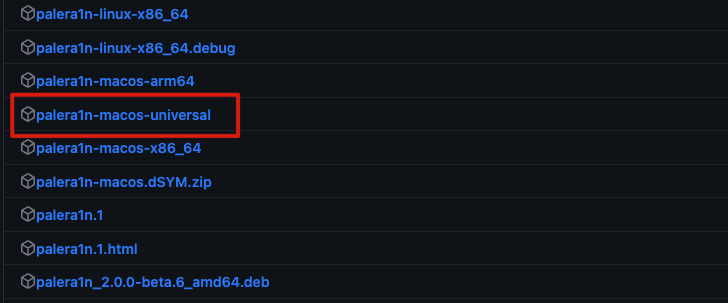
按照自己的平台下载对应的工具,我这边是Mac系统,所以下载 palera1n-macos-universal 这个。
Untitled

开始越狱:

按照官方官方WiKi操作:

Installing palera1n | iOS Guide

按照步骤一步一步操作就可以

1
2
3
4
5
6
7
8
9
10
11
12
13
14
15
16
17
18
19
20
21
22
23
1. Installing palera1n
Enable Full Disk Access for Terminal (this only has to be done once)

macOS Monterey and below: System Preferences → Security & Privacy → Privacy → Full Disk Access
macOS Ventura and above: System Settings → Privacy & Security → Full Disk Access
If Terminal does not show up in the list, click the plus icon and select it from Applications → Utilities.

2. If you are on macOS Monterey 12.2.1 or below, run the following commands (this only has to be done once):

sudo python -m ensurepip
sudo python -m pip install setuptools xattr==0.6.4

3. Open a terminal window and cd to the directory that palera1n was downloaded to (usually cd ~/Downloads).

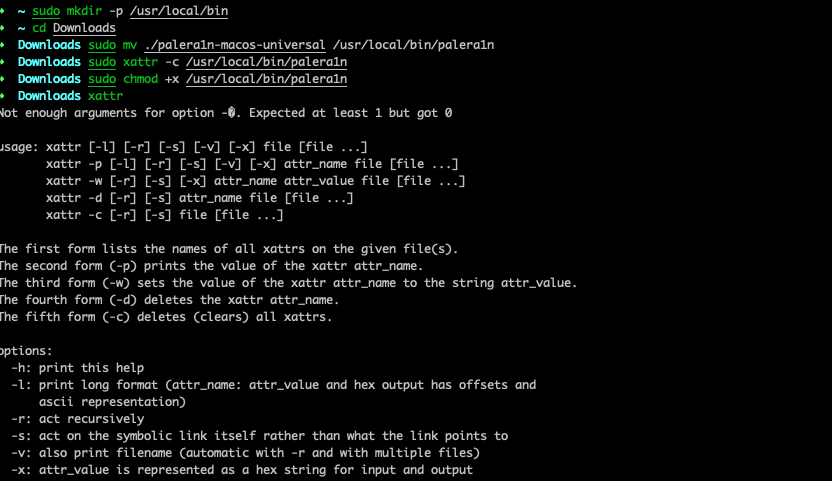
4. Run sudo mkdir -p /usr/local/bin

5. Run sudo mv ./palera1n-macos-universal /usr/local/bin/palera1n

Replace ./palera1n-macos-universal with whatever version you downloaded

6. Run sudo xattr -c /usr/local/bin/palera1n

7. Run sudo chmod +x /usr/local/bin/palera1n

Untitled

开始越狱:

注意⚠️,手机需要直接链接电脑,不能用扩展hub链接。

Untitled

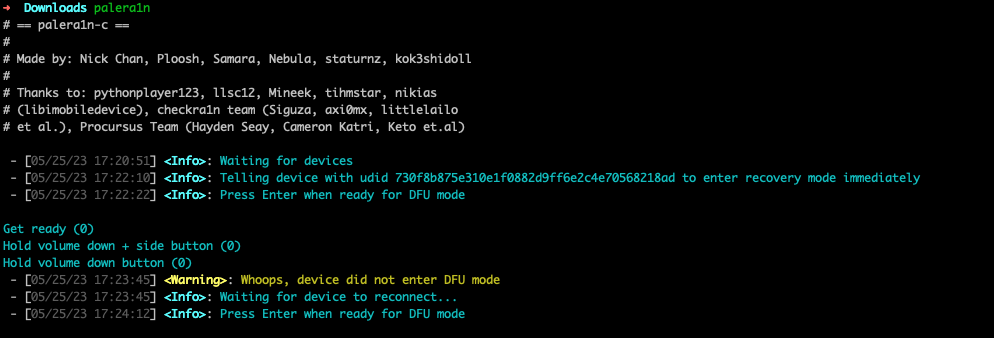
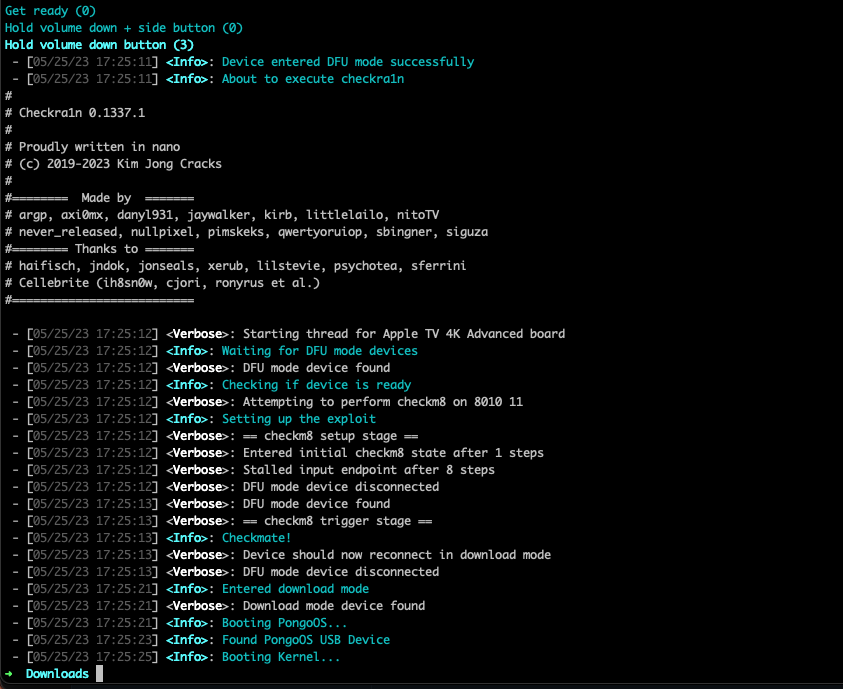
按照提示插入手机,会有相应的提示操作,按照提示信息让手机进入恢复模式(电源按键+音量减键同时按住)等待信息提示后,下一步松开电源按键继续按住音量减键。后面会自动执行越狱操作。
Untitled

手机会自动重启,完成后屏幕出现 palera1n应用表示越狱成功。

辅助网站

插件查询 https://www.iggxx.com/?golink=aHR0cHM6Ly93d3cuaW9zLXJlcG8tdXBkYXRlcy5jb20=
兼容性查询 https://www.iggxx.com/?golink=aHR0cHM6Ly9qbGlwcG9sZC5naXRodWIuaW8vdHdlYWtDb21wYXRpYmxl
更新推送频道 https://www.iggxx.com/?golink=aHR0cHM6Ly90Lm1lL0phaWxicmVha19Ud2Vha3M=

Cydia 源地址

Cydia贴吧源(推荐) https://apt.cydiaba.cn
S中文源 https://apt.sunbelife.com
雷锋源(推荐) https://apt.abcydia.com
知网少年源 https://apt.iphoneba.cn
FCydia蜂巢源 https://apt.fcydia.com
ppsspp模拟器源码 https://cydia.ppsspp.org
Keevi源 https://apt.keevi.cc
Karen’s Repo https://cydia.angelxwind.net
蚂蚁源中文源 https://apt.cydia.pro
越狱推送源 https://apt.cydiavip.com
Packix源 https://repo.packix.com
junesiphone.com源 https://junesiphone.com/supersecret/
Evelyn’s Collection源 https://evynw.github.io
Dynastic Repo源 https://repo.dynastic.co
Bingner源 https://apt.bingner.com/
多米诺骨牌源 https://apt.wxhbts.com/
Clezz源 https://apt.wxhbts.com/
Cydia(氵刀八木) https://aptso.cn/misc
CydiaKK中文源 https://apt.cydiakk.com
Chariz • https://repo.chariz.io/
Dynastic • https://repo.dynastic.co/
Packix • https://repo.packix.com/
BigBoss • http://apt.thebigboss.org/repofiles/cydia/

越狱插件

Battery Health Enable  解决更换电池健康度显示问题 https://poomsmart.github.io/
Bakgrunnur 真实后台 https://udevsharold.github.io/repo/
OTAEnabler 恢复系统更新 https://repo.alexia.lol/
CrashReporter 崩溃报告 https://cokepokes.github.io/
Appstore++ 应用降级 https://cokepokes.github.io/
CrackerXI 砸壳工具 https://cydia.iphonecake.com/
Xenhtml & Xeninfo http://junesiphone.com/supersecret/
shuffle 设置归类 https://creaturesurvive.github.io/repo/
Shortmoji 键盘增强 https://miro92.com/repo/
H2 数字2系列插件作者源 https://lzsxcl.github.io/repo/
AudioRecorder XS 通话录音 http://limneos.net/repo/
Sylph 锁屏音乐界面自定义 https://repo.daus.ch/
ReProvision Reborn 自签工具 https://repo.packix.com/
AppSync Unified 安装未签名的第三方 app https://cydia.akemi.ai/
Apple File Conduit “2” 激活PC端的所有路径访问权限 https://cydia.ichitaso.com/
iCleaner Pro 系统清理 https://ib-soft.net/
Filza 文件管理 https://www.tigisoftware.com/default/?page_id=475
Flex3 插件库 http://getdelta.co/
MTerminal 命令终端
FlyJB 屏蔽越狱检测
injectipa 一键注入插件
SemiRestore11 系统平刷 http://xnu.science/repo/
Succession 系统平刷 https://samgisaninja.github.io/test/
Zebra 斑马越狱商店 https://getzbra.com/
Installer 5 越狱商店 https://apptapp.me/repo/
Sileo 越狱商店 https://getsileo.app/